Help For primes
Audit packages
An audit package is one zip for a contracting officer: every signed attestation as PDF and JSON, your ledger and risk register as CSV, and a sha256 manifest.
Updated · Edwards Consulting Group
An audit package is what you hand a contracting officer instead of a spreadsheet. It is one zip file, built from your account as it stands, and kept in storage that cannot be changed or deleted, so the copy you hand over and the copy Tiermark holds are the same file.
What is in a package
| File | What it holds |
|---|---|
| attestations/supplier/attestation-version.pdf | One signed attestation, as a document: the questionnaire, every question and answer in order, who signed, when (UTC), and the content hash |
| attestations/supplier/attestation-version.json | The same attestation, machine-readable, with its content hash |
| ledger.csv | Every request you have sent, with the same columns as the Requests screen's export |
| risks.csv | Your risk register: title, severity, status (in the register's words: open, mitigating, corrective action plan, closed), source, supplier and UEI, when vetting was marked complete, both clock dates, and when the item was opened |
| README.txt | What the file is and how to check it, in plain text |
| manifest.json | Every file above with its size and sha256, and one hash over that list |
Each supplier's attestations are in a folder named by its UEI (or its Tiermark id when it has no UEI). The attestations are every signed answer set your organization may read, including ones a supplier answered by sharing an earlier signature.
What is not in it: no controlled unclassified information, no signer IP address, no email address, no access token or sign-in code. The person who built it is named in the manifest by Tiermark user id only.
Building one
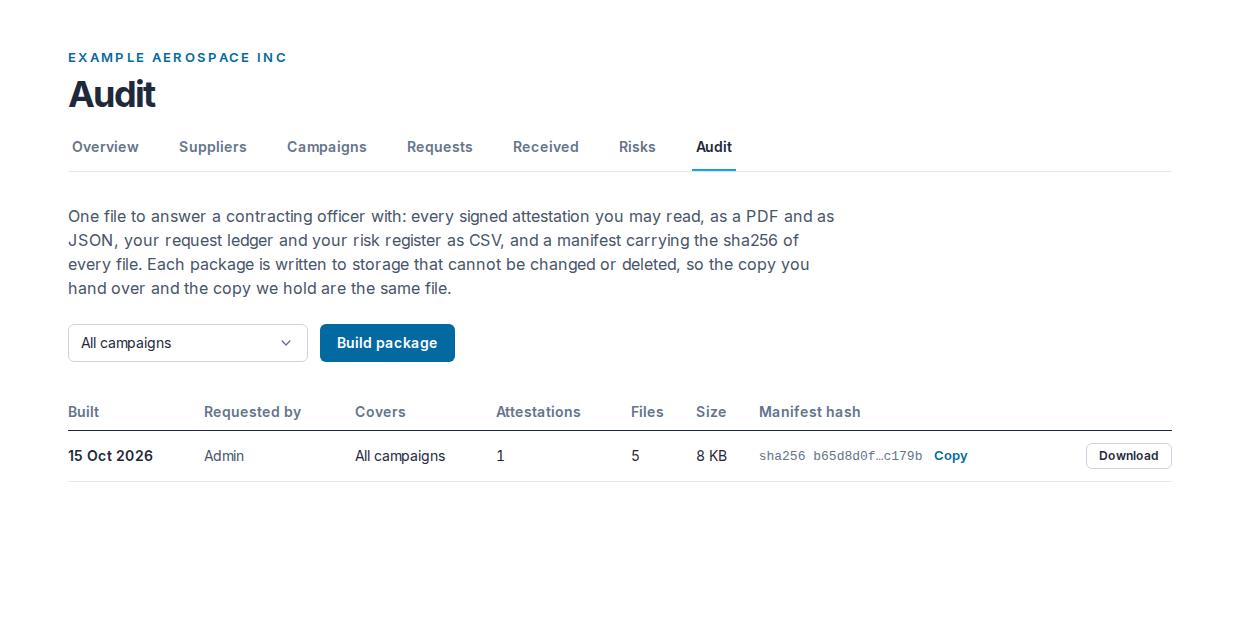
On Audit, leave the choice on All campaigns or choose one campaign, and press Build package. When it is done the page says "Package built" and the package is the first row in the table.
- A paid prime plan. A package carries your ledger and register out of Tiermark as CSV, which is what a plan buys. On Prime Free the build is refused; packages you already built stay downloadable.
- An admin or a contracts manager. A viewer sees the form, cannot press it, and can download any package.
- One build at a time for your organization. If another is being built, wait for it to finish.
- At most 500 signed attestations in one package. Above that the build is refused: build one package per campaign instead.
- Filtered to a campaign, the ledger and the attestations are that campaign's; the risk register is always the whole register, because a risk item is not tied to a campaign.
Building a package copies each supplier's signed answers into the file, and that read is recorded: each supplier sees "Copied into an audit package by your organization" on its own side. See Requests and signed answers.
The table
Each row is one package: when it was built (Built), the role of the person who asked for it (Requested by), what it covers (Covers: the campaign's name, or "All campaigns"), how many attestations and files it holds, its size, its manifest hash and Download. The hash shows as "sha256" followed by its first eight and last five characters; hover over it to see the whole hash, and press Copy beside it to copy the whole hash, to check against the package's own manifest.
Downloading
Press Download. Anyone in your organization may download a package, viewers included. The link works for fifteen minutes; after that, press Download again for a new one. Before a link is made, Tiermark checks that the file in storage still matches the hash it recorded when the package was built, and records the download in your audit trail.
Checking a package
Everything a reader needs is in README.txt, and it needs nothing but a shell:
- Every file: compute its sha256 (for example with sha256sum) and compare it with that file's entry in manifest.json.
- The list itself: manifest.json carries a manifestHash, the sha256 of the text "path, newline, size, newline, sha256, newline" for every file, in the order the list is written. The same value is recorded in Tiermark's own record of the package and in a manifest file stored beside the zip, so the list can be checked without trusting this copy of it. manifest.json does not list itself.
- Each attestation: its JSON carries a content_hash, the sha256 of the signed document in the canonical form README.txt spells out, with a worked example you can run. Those bytes were written once, when the supplier signed, and Tiermark refuses to read a signed answer set whose bytes disagree with its hash.
Each attestation's PDF and JSON are rendered from the same record, in the questionnaire's own order, so they cannot tell different stories.
Still have a question?
Write to help@tiermark.io and a person will answer.