Help For primes
The risk register
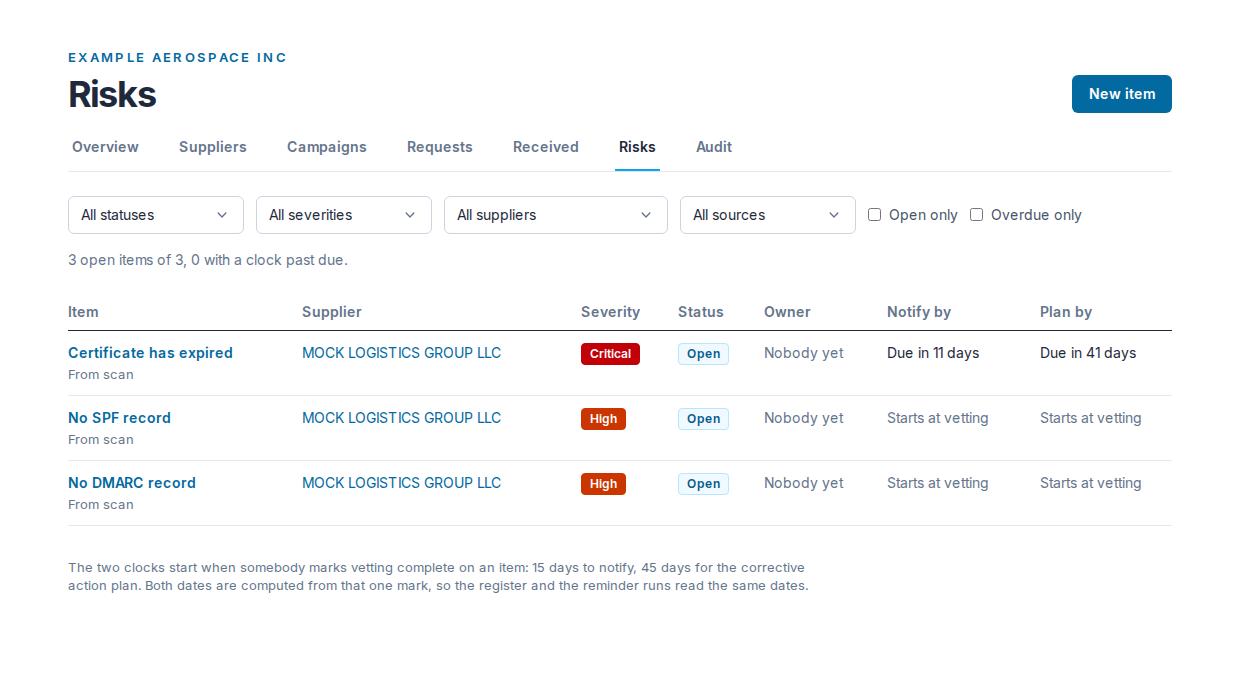
A supplier risk register with 15-day notification and 45-day corrective action plan clocks. Items come from signed answers, high and critical findings, or you.
Updated · Edwards Consulting Group
Risks is your organization's register: what a supplier's signed answers and its published findings imply, and what you have written down yourself. It is the argument you make to a contracting officer, and it goes into every audit package as CSV.
Deriving items from a supplier
Open the supplier's record from Suppliers and press Derive from signed answers and findings. Tiermark reads the supplier's newest signed answer set and its published findings, and writes one item per rule that fires:
- From the signed answers: the rules in the table below, over the DFARS 252.204-7012 baseline questionnaire. "Not applicable" is an answer, not a finding, and a question the supplier left blank fires nothing.
- From the findings: one item per published finding of severity high or critical, at the finding's own severity. Medium, low and informational findings stay on the supplier's record with their evidence and do not become items.
Pressing the button twice adds nothing. An item already in your register keeps its owner, its notes and its status. The button says what it did: how many items the rules found and how many were new. Only an admin or a contracts manager sees it.
Deriving reads the supplier's signed answers, and that read is recorded; the supplier sees "Read for your organization, by their risk register, not by a person". No free text a supplier typed is copied into an item: only the values of the yes-or-no, number and choice questions the rule read, so the item can be checked against the answers.
The answer rules
| Item | Severity | When it fires |
|---|---|---|
| SPRS score not posted | high | Handles covered defense information, and the score is not posted in SPRS |
| No NIST SP 800-171 self-assessment | high | No self-assessment completed |
| No system security plan | high | No system security plan |
| More than twenty requirements not implemented | medium | 21 to 50 requirements not yet fully implemented |
| More than fifty requirements not implemented | high | More than 50 requirements not yet fully implemented |
| Cannot meet 72-hour incident reporting | critical | Cannot discover, report through DIBNet and preserve evidence within 72 hours |
| No DoD medium assurance certificate for DIBNet reporting | medium | Handles covered defense information, and holds no medium assurance certificate |
| Multifactor authentication not enforced everywhere | high | MFA not enforced for every account with access, including privileged and remote |
| FIPS 140 validated cryptography not in use | medium | CDI not protected with FIPS 140 validated cryptography at rest and in transit |
| Cloud service below FedRAMP Moderate | high | A cloud service holds CDI without meeting FedRAMP Moderate or an equivalent |
| DFARS 252.204-7012 not flowed down | medium | The clause is not flowed down to subcontractors that handle CDI |
| Incident in the past twelve months | medium | A cyber incident affecting CDI in the past twelve months |
| CMMC not started | medium | Handles covered defense information, and CMMC status is "Not started" |
An item derived from the signed answers carries the sentence that says why, the answer values the rule read, and a link to the signed answers. An item derived from a finding carries the finding and when it was observed; the finding itself, with its evidence, is on the supplier's record.
Entering an item by hand
On Risks, press New item on the title row. A form headed New risk item opens: the supplier it is about (or Your own organization, for a policy gap or a clause you have to flow down), a severity (critical, high, medium or low), what the risk is, an owner from your organization or Nobody yet, and a mitigation if there is one yet. Press Add the item, or Cancel to close the form. A hand-entered item's source is manual (the register says "From manual" under it), so a reader can always tell it from a derived one.
The register
The line above the table says how many items are open and how many have a clock past due. The filters are All statuses, All severities, All suppliers, All sources, Open only and Overdue only; each applies as soon as you choose it. The columns are the item (with its source under it), its supplier, severity, status, owner, Notify by and Plan by. A clock reads "Starts at vetting" until vetting is marked complete, then "Due in N days", "Due today" or "Overdue by N days", in red once it is overdue.
Statuses
An item is Open, Mitigating, Corrective action plan or Closed, in that order. A status moves forward only, never back: the item page offers only the moves the ladder allows (Move to mitigating, Move to corrective action plan, Close this item). Close this item stands apart at the end of the row, because it ends the item.
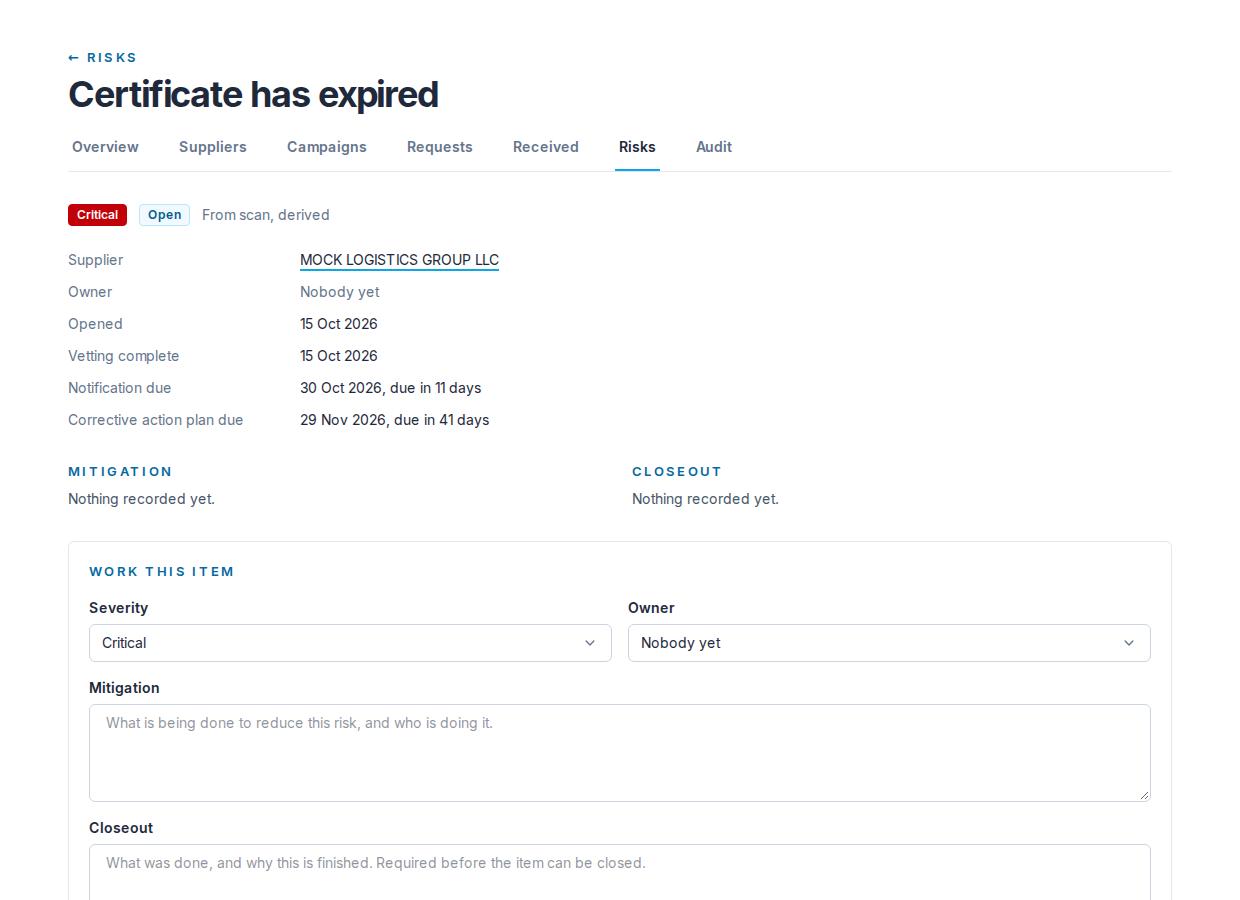
On the item page, Work this item holds the severity, the owner, the Mitigation and the Closeout. Press Save after a change; only the fields that changed are recorded.
Closing needs a closeout: what was done, and why this is finished. Pressing Close this item with the closeout you have just typed sends both together. An item cannot be closed with an empty closeout.
The History at the foot of the page records each change as a sentence with its date and who made it: "Item added", "Derived from signed answers and findings", "Updated" followed by the fields that changed (for example "Updated: owner, mitigation"), and "Vetting marked complete". It records which fields changed and never what they were set to. A line made moments ago says "Sealing into the audit chain" until it is sealed; a line that does not match its sealed original says "Integrity check failed" instead of what it says.
Mark vetting complete, and the two clocks
Press Mark vetting complete on an item when your vetting of it is done. This starts the register's two clocks:
- Notification due: 15 days after the mark.
- Corrective action plan due: 45 days after the mark.
On the item page each row shows the date and how it stands ("15 Oct 2026, due in 3 days"), or "Not started" before the mark.
Both dates are computed from that one mark, so the register, the item page and the email notices read the same dates. The mark can be made once and cannot be undone. The page asks you to confirm before it is made.
The two periods are the ones Executive Order 14415 directs for its implementing rules, counted from the completion of vetting; those rules are still to come, and your contracts decide your obligations. See Executive Order 14415.
The email notices
An hourly run checks every open item whose clocks are running and sends one email per organization listing what needs attention: seven days before each clock's date and on the day, for the notification clock and for the corrective action plan clock. Each item in the message names the supplier, the item, which clock, how the date stands, and a link to the item.
- Only the most urgent notice an item has reached is sent, once. Once a more urgent point is reached, an earlier one not sent is skipped. A notice reached and not yet sent goes out at the next hourly run, and an on-the-day notice sent late says how many days ago the date was.
- A closed item gets no notices.
- The notices go to every admin of your organization. They are about your own account, so they carry no unsubscribe link. To change who receives them, write to help@tiermark.io.
- The item page lists the notices already sent under Notices sent.
Who may change items
An admin or a contracts manager may derive items, add them, edit them, move their status and mark vetting complete. A viewer reads the whole register and changes nothing.
Still have a question?
Write to help@tiermark.io and a person will answer.