Help For primes
Your supplier map
Build a supplier map from USAspending.gov subawards and SAM.gov registrations, add a supplier by UEI, and read each supplier's grade and record.
Updated · Edwards Consulting Group
Your supplier map is the list of companies Tiermark assures for you. Everything else in the console (campaigns, requests, the risk register, audit packages) works from it. Which clauses you have to flow down to which of these suppliers is your contracts' question; Flow-down for primes is a plain-English starting point.
Building the map from your report
On Overview, press Build my map. Tiermark reads the public record for your organization's UEI: the awards and subawards reported on USAspending.gov and the registrations in SAM.gov. It writes your exposure report, puts the suppliers it found on your map, and starts a passive scan of each supplier's domain.
- Who may press it: an admin or a contracts manager. Viewers do not see the button.
- It needs your UEI. The report is keyed on it. If your organization has no UEI on file, an admin adds it on the Settings tab: see Adding your UEI later.
- It takes one to three minutes. The button says Building… while it runs, and the line beside it says so; reload the page to see the result.
- One build at a time. Pressing it while a build is running tells you so and starts nothing new.
- Rebuild my map is the same button once a report exists. A rebuild reads the record again and adds any supplier it finds that is not already on your map.
When a build finds more suppliers than your plan covers, it adds the biggest first, up to the limit, and the overview says how many it held back. Every company it found still gets its profile, grade and findings, so adding one later by UEI, or building again after choosing a larger plan, costs nothing.
Adding a supplier by UEI
On Suppliers, press Add a supplier on the title row. A form opens: type the company's 12-character UEI from SAM.gov into Unique Entity ID (UEI) and press Add, or Cancel to close the form. A UEI is letters and digits, never the letters I or O.
The Legal name (if we do not have it yet) field is optional. It is used only to name a company Tiermark does not hold yet when SAM.gov's registration carries no legal name. When SAM.gov has a name, its name is used. If SAM.gov cannot be reached, the add is refused and you can try again later.
How the add is answered, in order:
- A company Tiermark already holds (one on any customer's map, or one looked up before) is added at once. No SAM.gov request is spent.
- If your map is at its limit, the add is refused before anything else is checked.
- If the UEI is in SAM.gov's public monthly extract, which Tiermark keeps, the company is added from it and no check is spent.
- Otherwise Tiermark asks SAM.gov. Your organization may check 3 new UEIs a day with SAM.gov. The refusal says when the next check is available. Suppliers already in Tiermark do not count and can be added at any time.
- If SAM.gov has no active registration for the UEI, that answer is remembered for 24 hours for everyone, so checking again sooner costs nothing and changes nothing.
A supplier that has no grade yet is scanned when it is added. Its record says Being assessed now until the grade and findings arrive, usually within a few minutes. A supplier that already has a grade keeps it.
Your plan's supplier limit
| Plan | Suppliers on your map |
|---|---|
| Prime Free | 5 |
| Prime Starter | 50 |
| Prime Growth | 150 |
| Prime Scale | 400 |
| Prime Enterprise | no limit |
At the limit, adding a supplier is refused with the sentence "Your plan (name) covers N suppliers. Remove one, or choose a larger plan in the Plan panel." The Plan panel is the Plan strip at the top of Overview. A map build on a full plan adds the biggest suppliers it found, up to the limit. See Plans and prices.
The Suppliers table
The line above the table says how many suppliers match your filters, out of how many are on the map.
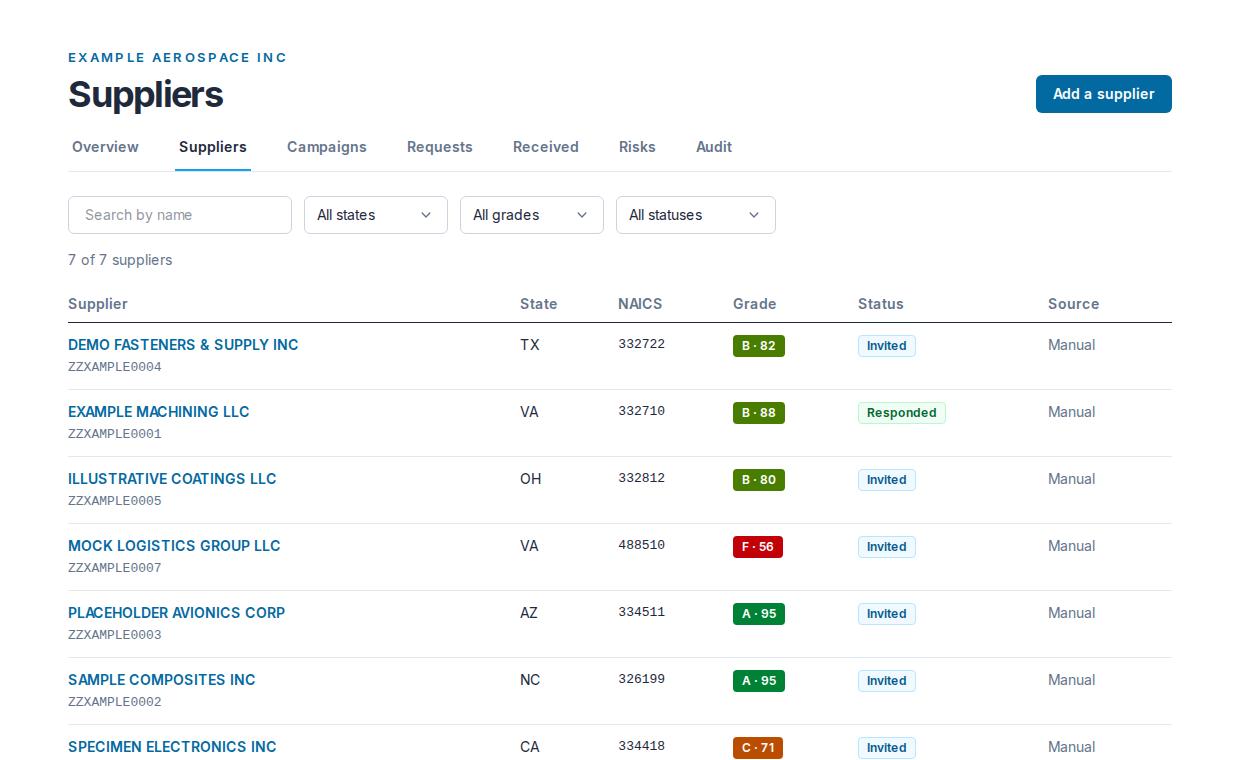
| Column | What it shows |
|---|---|
| Supplier | The legal name, with its UEI from SAM.gov under it (or "No UEI"), and a match percentage when the public record matched the company at less than 100% |
| State | From the SAM.gov registration |
| NAICS | The first two codes on the registration |
| Grade | The letter and score, or "Not graded" |
| Status | Where your most recent request to this supplier stands |
| Source | How the company came onto your map: Subaward from a map build, Manual when added by UEI |
The filters are a search by name, All states, All grades (A to F) and All statuses. A filter applies as soon as you choose it; the search applies when you press Enter.
The status words:
- Mapped: on your map, no attestation request sent yet.
- Invited: the invitation was sent.
- Opened: the supplier opened the link.
- Started: the supplier opened the questionnaire.
- Responded: the supplier signed its answers.
- Expired: the due date passed without a signature.
Grades
A map build scans every supplier it finds, and a supplier added by UEI is scanned if it has no grade yet. On a paid prime plan, every supplier on your map is graded again at least every 30 days. On Prime Free, Tiermark does not schedule a re-grade; a supplier's grade still updates when its company is scanned for another reason (another customer's plan, a public lookup, or the supplier's own re-check).
The grade is from A to F with a score out of 100, from passive observation of public DNS, mail authentication, certificates and TLS. It is an observation, not a compliance determination. See Your grade and how to fix what it found for what the findings mean; it is the same grade the supplier sees.
A supplier's record
Press a supplier's name to open its record.
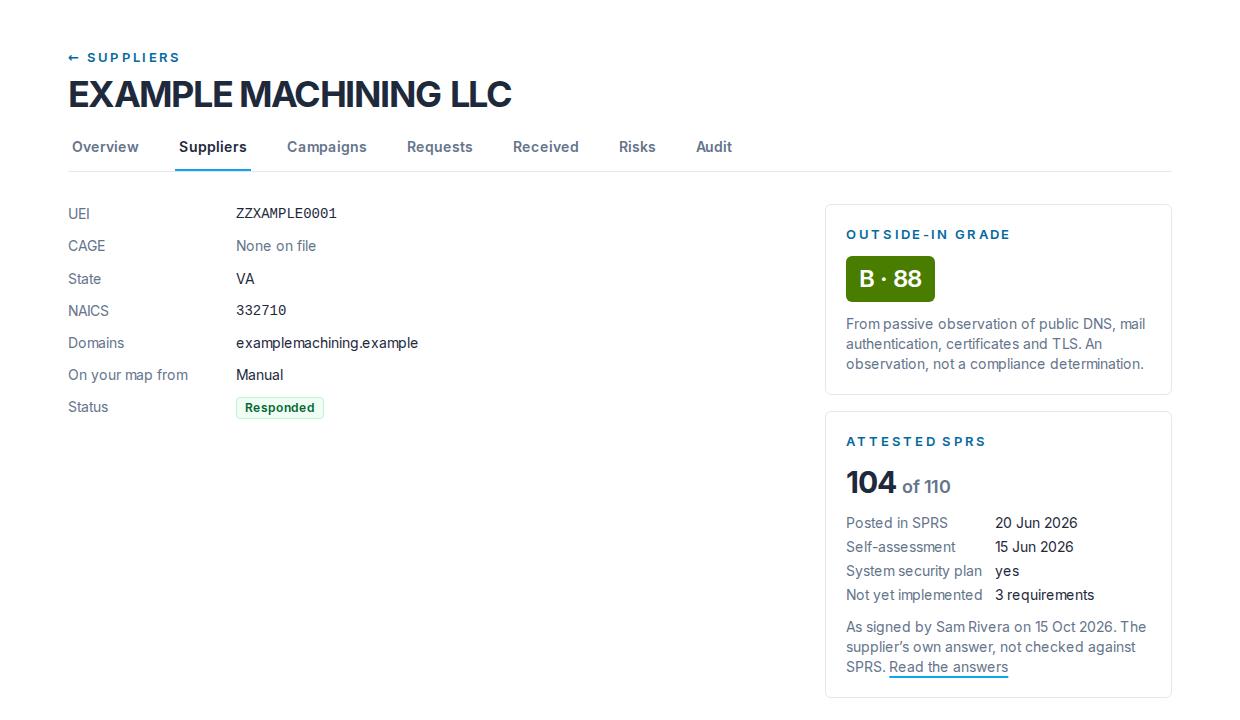
Details
UEI, CAGE, state, NAICS codes, domains, On your map from (Subaward or Manual, with "matched at N%" when the public record matched the company at less than 100%), and its status. Tiermark never tells one prime which other primes list a supplier.
Outside-in grade
The grade card. While a new supplier is being scanned it says Being assessed now: reload the page in a few minutes.
Attested SPRS
What the supplier signed about SPRS in your DFARS questionnaire, from its newest signed answer set: the score out of 110, whether and when it was posted in SPRS, the self-assessment date, whether it has a system security plan, and how many requirements are not yet implemented, with who signed and when. It is the supplier's own answer, not checked against SPRS. Before a campaign it says Not asked yet; after one, Nothing signed yet until the supplier signs.
Opening a supplier's record reads its signed answers to fill this card. That read is recorded, and the supplier can see on its own side that your organization read its answers on that day.
Findings
Every published finding from the scan: its title and detail, severity, the evidence observed, and when. A company with no public domain has nothing to observe and the page says so.
Contact candidates
Addresses read from the supplier's own public web pages, best guess first, each with the page it was found on and when. They are suggestions for who to invite; you choose. SAM.gov point-of-contact addresses are For Official Use Only and never reach Tiermark.

Attestation timeline
Every request you have sent this supplier, with the day it was sent, its status and its due date (dates read "15 Oct 2026" throughout the console), and under it every signed answer set you may read: the questionnaire, when you asked, the version, who signed, when, and the content hash. Read the answers opens the signed document. A row marked "Shared from an attestation signed on a date for another customer" was answered by sharing rather than by a signature addressed to you: it is the same document, with the same signer and hash. See Requests and signed answers.

Risk register
Derive from signed answers and findings reads this supplier's newest signed answers and its published high and critical findings, and writes one risk item per rule that fires. Pressing it twice adds nothing. Only an admin or a contracts manager sees it. See The risk register.
Remove from my map
The Remove from your map section at the foot of the record has the Remove from my map button; only an admin or a contracts manager sees it. Removing a supplier removes your relationship to it, after a confirmation. The company's public record, grade and findings stay, and the requests you have sent it stay on your Requests screen. So do its signed answers: a signed request there has Read the answers, whether or not the supplier is still on your map.
Who may change the map
An admin or a contracts manager may build the map, add a supplier and remove one. A viewer reads everything and changes nothing. See Setting up your organization for the roles.
Still have a question?
Write to help@tiermark.io and a person will answer.