Help For suppliers
Your grade and how to fix what it found
Your outside-in security grade from public DNS, SPF, DMARC, DKIM, certificates and TLS, with every finding behind it. Supplier Pro adds how to fix each one.
Updated · Edwards Consulting Group
My grade is in your supplier console. It shows the grade a prime sees when your company is on its supplier map, and every finding behind it, with the evidence. That part is free.
Where the grade comes from
The grade is from A to F, with a score out of 100. It comes from passive observation of what anyone on the internet can see about your website and your email domain: DNS, mail authentication (SPF, DMARC, DKIM), certificates and TLS. Nothing on your systems is tested or touched.
Each finding costs a set number of points. A mail finding costs nothing when your domain takes no mail: there is nothing to spoof.
A grade is an observation from outside, not a determination of compliance with DFARS, NIST SP 800-171 or CMMC.
How to fix each finding (Supplier Pro)
With Supplier Pro, every finding on My grade has How to fix under it:
- What it means for your company, in plain English.
- The steps, short and concrete: for most findings, one record to add or change in your domain's DNS, or one setting in your email provider's admin console.
- Who usually does this: whoever manages your DNS (often your web host or domain registrar), your email provider's admin (Microsoft 365, Google Workspace), or your web host.
- To check that the fix took.
- What it costs your grade, in points ("Costs 6 points of your grade"), so you can start with the ones that matter most. A finding that is good practice but not graded says it costs nothing, and a mail finding on a domain that takes no mail says it counts for nothing here.
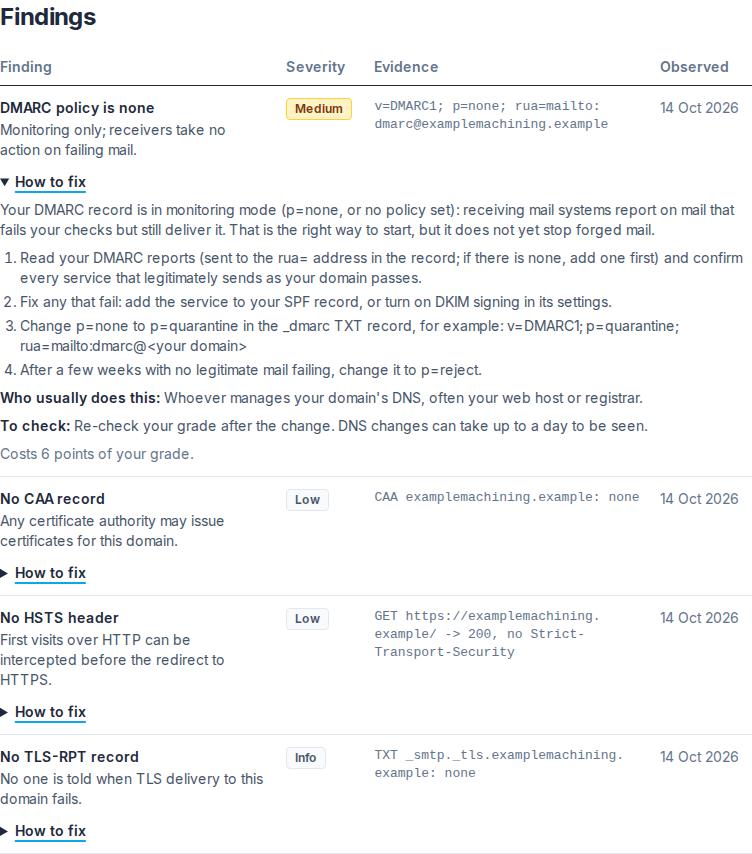
Most fixes are a few minutes' work for whoever manages your domain. DNS changes can take up to a day to be seen everywhere.
After you have fixed something
Your grade is not updated the moment you change a record. A prime's paid plan has every supplier on its map graded again at least every 30 days. With Supplier Pro you can also re-check your grade yourself, once a day.
Questions
- A finding looks wrong. Write to help@tiermark.io with the finding's title. The evidence column shows exactly what was observed and when.
- SAM.gov lists the wrong website for us. The grade is of the website your SAM.gov registration lists. Correct it in SAM.gov, then write to us.
Still have a question?
Write to help@tiermark.io and a person will answer.