Help For suppliers
The SPRS score calculator
How an SPRS score is worked out: start at 110, lose 5, 3 or 1 points per requirement not met, partial credit for 3.5.3 and 3.13.11, and what a POA&M may hold.
Updated · Edwards Consulting Group
The SPRS score page in your supplier console lists the 110 security requirements of NIST SP 800-171 Revision 2, the ones a CMMC Level 2 self-assessment covers, in their 14 families. With Supplier Pro, mark each requirement met, partly met, not met or not applicable, and see your SPRS score as the DoD method works it out.
No account? The free SPRS score calculator works the score out the same way, with nothing saved. Supplier Pro keeps your answers, with the objectives, the POA&M and the system security plan outline.
The score is an estimate by the DoD Assessment Methodology as written into 32 CFR 170.24. It is not an assessment. Tiermark does not post anything to SPRS: you enter your own score there.
How the score works
- Everyone starts at 110.
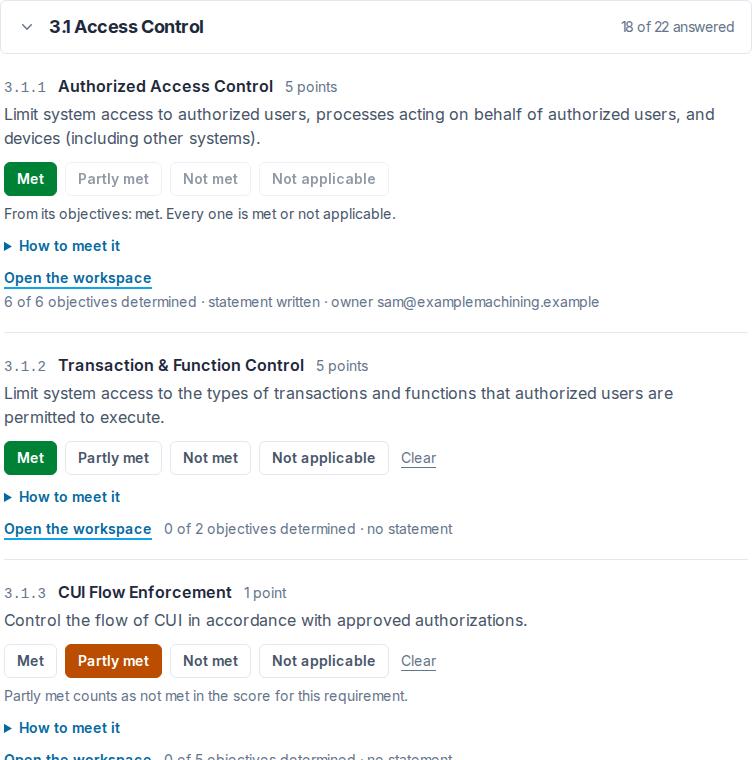
- Each requirement that is not met takes away its points: 5, 3 or 1, as the regulation weighs it. The page shows each requirement's points.
- Not applicable counts as met.
- Partly met counts as not met, except for the two requirements below.
- 3.12.4, the system security plan, has no points of its own, but without one there is no score at all.
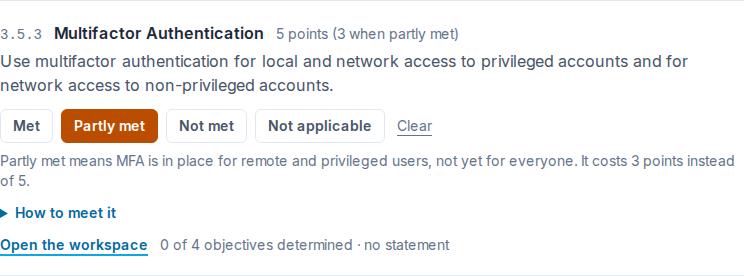
The two requirements the regulation gives partial credit:
- 3.5.3 (multifactor authentication) costs 3 instead of 5 when MFA is in place for remote and privileged users, but not yet for everyone.
- 3.13.11 (FIPS-validated cryptography) costs 3 instead of 5 when CUI is encrypted, but not with FIPS-validated cryptography.
The lowest possible score is -203.
What a POA&M may hold. CMMC allows a plan of action (POA&M) for the gaps only when the score is 88 or more (80% of 110). Only requirements worth 1 point may go on a POA&M, plus 3.13.11 when it is partly met. Six never may: 3.1.20, 3.1.22, 3.10.3, 3.10.4, 3.10.5 and 3.12.4 (32 CFR 170.21). The page lists any gap that cannot go on one.
The full explanation of the method, with worked examples, is in SPRS score explained.
The page
The families start folded to a row with the family's name and how many of its requirements are answered, except the first family with something still to answer; press a family to open it, or use Open all families and Fold all families above the list. Choosing a filter shows every matching family open. Mark each requirement and the score updates as you go. Your answers are saved as you choose them.
While you are still answering
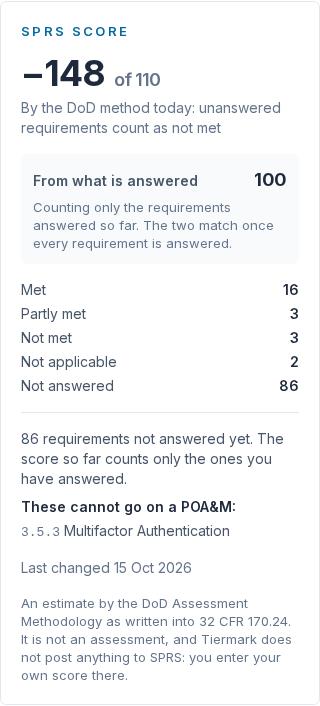
While any requirement is unanswered, the big number is the score by the DoD method today: every requirement not yet answered is counted as not met, which is how the method counts anything not shown to be met, and the line under the number says so. Beneath it, From what is answered gives the score so far: 110 less what the requirements you have answered cost, counting only those. Early on the big number can be far below zero; it rises as you answer. The two are the same once every requirement is answered, and that is the score you would post.
What the page tells you
- Your score, and how many requirements are met, partly met, not met, not applicable and not answered. On a phone the score stays in a slim bar under the header while you scroll.
- Each answer in its own colour: met is green, partly met amber, not met red and not applicable grey, so a family's answers can be read at a glance.
- Whether you could hold a Conditional status, by the POA&M rules above, and any gap that cannot go on a POA&M.
- How to meet each requirement, in plain English, under How to meet it beneath each one.
Who can change the answers
An admin or a contracts manager. Everyone in your organization can see them. Each change is recorded with who made it and when.
Answering a customer's questionnaire
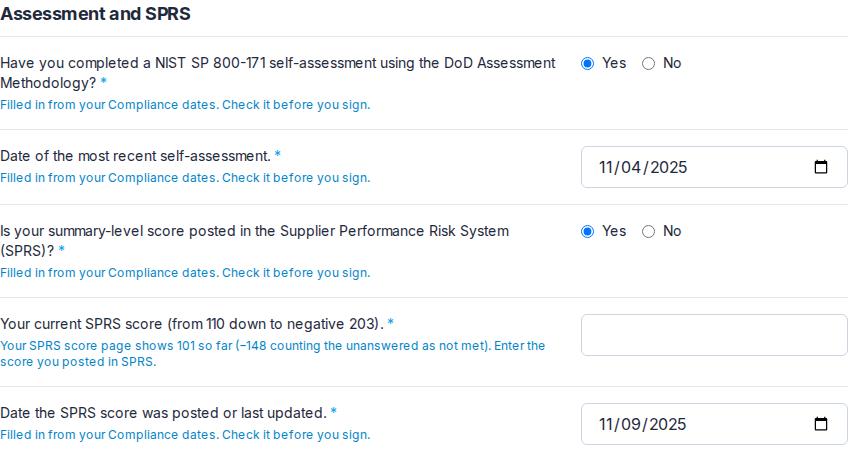
When a customer asks you for a DFARS attestation, the questionnaire asks about your self-assessment and SPRS. With Supplier Pro, the answers your saved work can give are filled in for you where you have not answered yet: whether you have a system security plan (from 3.12.4 here), and how many requirements are not yet fully met (once every requirement here is answered). Your dates come from Compliance dates. Each one says where it came from. Check them before you sign: what you sign is what your customer reads.
Your SPRS score is never filled in. The question asks for the score you posted in SPRS, which Tiermark does not know. The score from this page is shown beside the question, so you can compare.
What is kept, and who can see it
The status you choose for each requirement, and what you write in its workspace: no documents. Your answers here are your organization's alone. Primes do not see them, and nothing in Tiermark shares them. A customer sees only what you sign in its questionnaire, including the SPRS score you enter there. Do not put Controlled Unclassified Information (CUI) anywhere in Tiermark.
If Supplier Pro ends, your answers and score stay, and you can see them; changing them needs Supplier Pro again.
Answering by objective
Under every requirement, Open the workspace shows its NIST SP 800-171A assessment objectives, the ones an assessor determines. Mark each one met, not met or not applicable, and once any is determined the requirement's status follows from them: not met when any one is not met, met once every one is met or not applicable, and in progress (counted as not answered) until then. The requirement's own buttons are turned off while its objectives decide its status; 3.5.3 and 3.13.11 can still be marked partly met or not met while their objectives say not met. The workspace also holds how each requirement is implemented, who owns it, its plan of action with milestones, where its evidence is kept, and its history. See The self-assessment workspace, and The system security plan outline for the outline built from it.
Which version of NIST SP 800-171
CMMC Level 2 is written against Revision 2, and that is what DoD assesses today, though NIST has since published Revision 3. The calculator follows the regulation.
Still have a question?
Write to help@tiermark.io and a person will answer.