Help For suppliers
The system security plan outline
A system security plan (SSP) outline as a PDF and your POA&M as a CSV, built from a short form about your system and your self-assessment workspace.
Updated · Edwards Consulting Group
The System security plan page in your supplier console has a short form about the system that handles CUI, and two downloads built from that form and from your self-assessment workspace: an outline of a system security plan as a PDF, and your plan of action and milestones (POA&M) as a CSV.
The outline is a starting point for your organization's own system security plan, not a finished one and not an assessment. Every page says it was prepared from your own entries. Whether you have a system security plan (requirement 3.12.4) is your own answer on the SPRS score page; downloading the outline does not answer it.
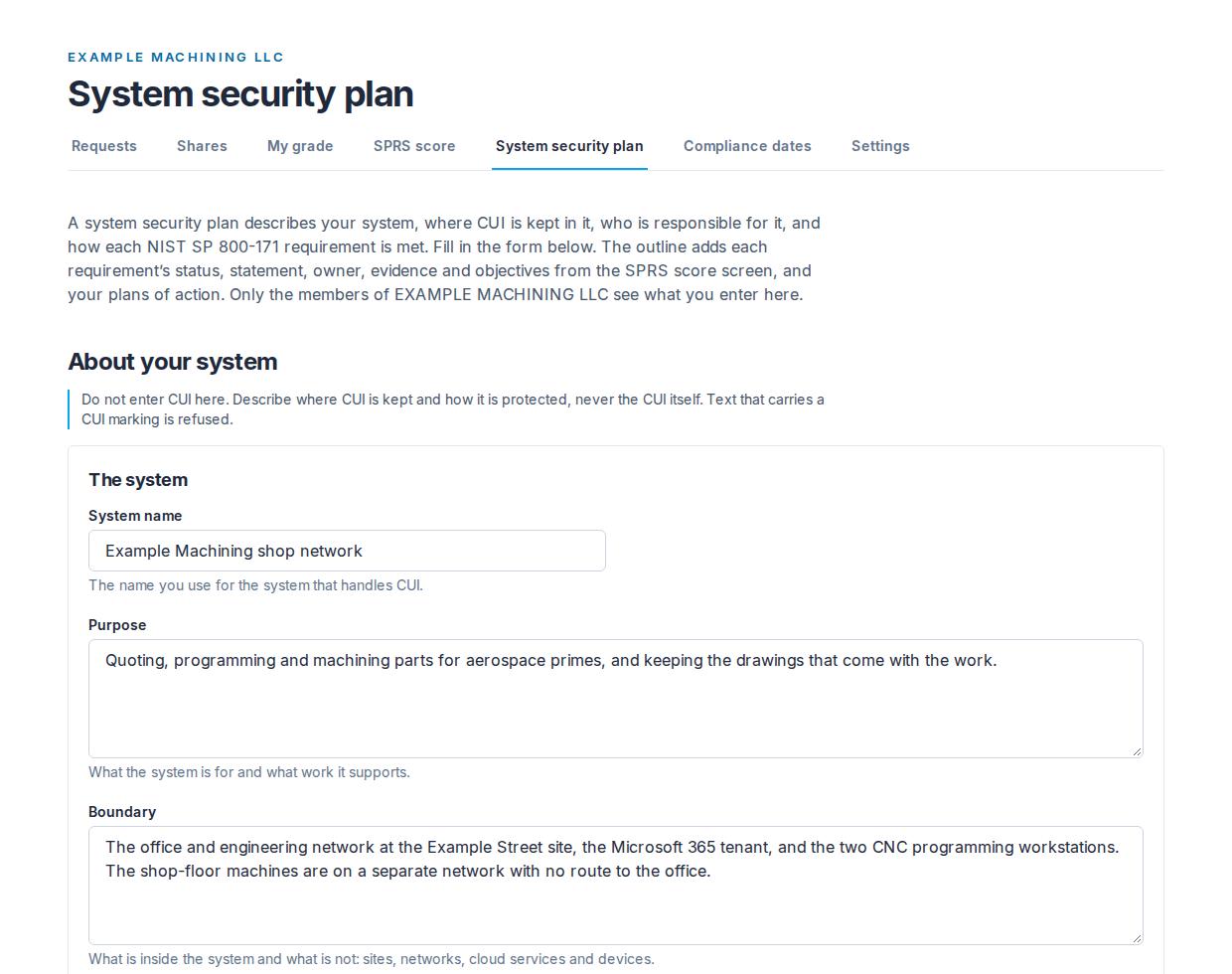
The form
Twelve fields in four groups. Each is optional, and each has a line under it saying what to write.
- The system: the system name, its purpose, and its boundary (what is inside it and what is not: sites, networks, cloud services and devices).
- Its environment: the environment it runs on, and the connected systems it exchanges data with.
- Where CUI is stored, processed and sent: the places CUI is kept, where it is worked on, and how it moves in and out.
- The roles: the system owner and how to reach them, and the security contact and how to reach them.
Save the plan keeps the whole form. The names and contacts take up to 200 characters; the purpose, boundary, environment and connected systems up to 4,000; the three CUI fields up to 2,000.
Do not enter CUI here. Describe where CUI is kept and how it is protected, never the CUI itself. Text that carries a CUI marking is refused.
The downloads
Both files use what is saved now: the form, and every requirement's status, objectives, statement, owner, evidence and plan of action from the workspace.

The SSP outline (PDF)
The file is named ssp-outline- and the day it was made. Its first page names your organization, its UEI and CAGE code where Tiermark has them, and when the outline was generated, and says that it is your organization's own description of its system, that Tiermark did not assess or verify any of it, and that it is a starting point for your plan. Then:
- Sections 1 to 4, The system, Environment and connected systems, Controlled unclassified information (CUI), and Roles: the form, field by field. A field you have not filled in reads "Not entered".
- Section 5, Security requirements: the 110 requirements, by family. Each one you have answered or entered anything for has its status, how many of its objectives are determined, its implementation statement, its owner, its evidence and whether it has a plan of action; once any of its objectives is determined, each NIST SP 800-171A objective is listed with your determination. The requirements with nothing entered yet are listed by number and title at the end of their family.
- Section 6, Plan of action and milestones (POA&M): every plan of action you have entered, in requirement order: the requirement's status, the weakness, the planned fix, the planned completion date, the milestones and whether each is done, whether 32 CFR 170.21 allows the requirement on a POA&M, and the owner.
- Section 7, SPRS score: the score as the SPRS score page shows it, what it means, the counts, your Conditional Level 2 (Self) status date and the POA&M closeout deadline if you have entered one, and the calculator's disclaimer.
At the foot of every page: "Prepared with Tiermark from the organization's own entries. Not an assessment." and the page number.
The POA&M (CSV)
The file is named poam- and the day it was made. One row per plan of action you have entered, in requirement order, with these columns: Requirement, Title, Status, Weakness, Plan, Planned completion, Milestones, Allowed on a POA&M under 32 CFR 170.21 (yes or no) and Owner. Dates are written as YYYY-MM-DD so a spreadsheet reads them as dates. The milestones are in one cell, each as its date, what it is, and "(done)" or "(not done)", separated by semicolons.
Who can change the form, and who can download
An admin or a contracts manager changes the form. Everyone in your organization can read it and download both files, a viewer included: the plan is your organization's own, and a viewer is often the person sent to fetch it. The page opens once your organization is verified.
What is kept, and who can see it
The form is your organization's alone: primes do not see it, nothing in Tiermark shares it, and Tiermark support cannot read it. The files are made when you download them and are not kept by Tiermark.
If Supplier Pro ends, your entries are kept and shown as they were saved; changing them or downloading the outline needs Supplier Pro again.
Still have a question?
Write to help@tiermark.io and a person will answer.