Help For suppliers
The self-assessment workspace
A NIST SP 800-171 self-assessment workspace per requirement: its 800-171A assessment objectives, implementation statement, owner, POA&M, evidence and history.
Updated · Edwards Consulting Group
With Supplier Pro, every requirement on the SPRS score page has Open the workspace under it (open the requirement's family first; the families start folded). The same link reads Close the workspace while it is open. The workspace is where the self-assessment behind your score is written down: each requirement's assessment objectives, an implementation statement, an owner, a plan of action (POA&M), an evidence register and a history. Each part is saved on its own.
This is your own self-assessment. Tiermark keeps what you enter and does not assess it. Do not enter Controlled Unclassified Information (CUI) anywhere in it: every text is checked for a CUI marking, and text that carries one is refused.
Assessment objectives
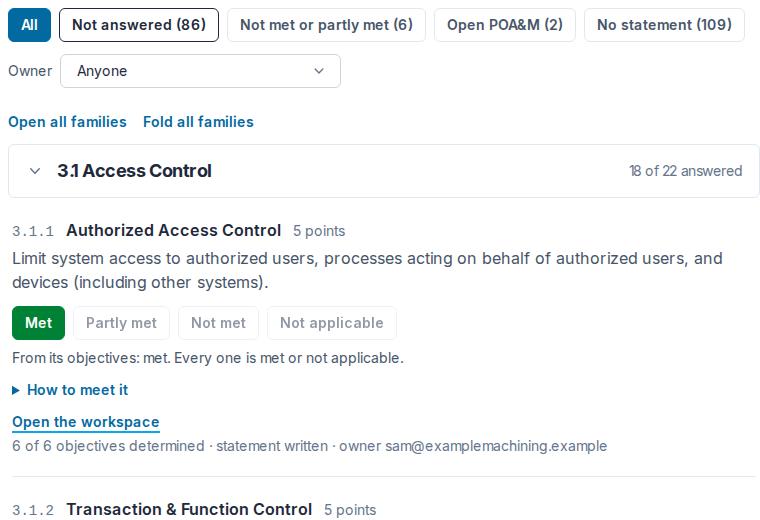
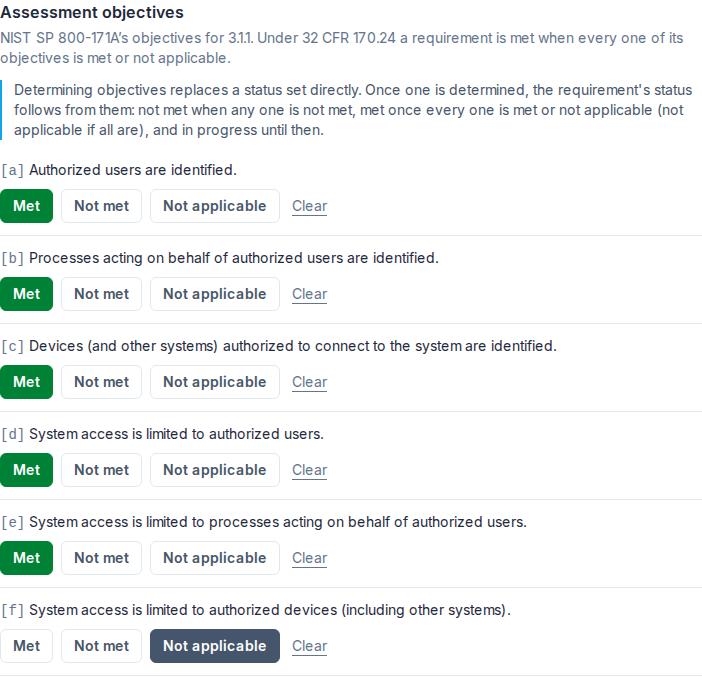
NIST SP 800-171A lists what an assessor determines for each requirement: its assessment objectives, 320 across the 110 requirements. The workspace shows each requirement's objectives, lettered [a], [b], [c] and so on, with NIST's text. Mark each one Met, Not met or Not applicable; Clear takes a determination back.
Until you determine any objective, a requirement's status is the one you choose on its buttons, as the calculator describes. Once one objective is determined, the requirement's status follows from its objectives, as 32 CFR 170.24 has it: a requirement is met only when every objective is met or not applicable.
- Any objective not met: the requirement is not met.
- Every objective determined, each met or not applicable: met (not applicable if all are).
- Otherwise in progress, which the score counts as not answered.
The requirement's own status buttons are turned off while its objectives decide its status; to change the status, change an objective. The requirement's row says what its objectives make of it, for example "From its objectives: in progress, 4 of 6 determined". Clear every objective and the requirement goes back to not answered, with its buttons on again.
The two requirements with partial credit are the exception. No objective can express "partly met", so on 3.5.3 and 3.13.11 you can still choose Partly met (or Not met) directly while their objectives say not met, and partly met is kept as your choice while they do. The score then gives the partial credit the calculator article describes.
How it is implemented
An implementation statement: how your organization meets the requirement, the tools, settings and steps, in your own words, up to 4,000 characters. Save the statement keeps it.
Owner
The member of your organization who answers for the requirement, chosen from your organization's members; Save the owner keeps the choice, and Nobody yet clears it. If the owner later leaves your organization, the workspace says A former member until you choose another.
Plan of action (POA&M)
For a requirement that is not met yet: what is not met (the weakness), the planned fix, the planned completion date, and milestones, each a date, what it is, and whether it is done. Up to 20 milestones, kept in date order. A plan needs its weakness and its planned completion date; the planned fix and the milestones are optional. A plan past its planned completion date says so while its requirement is still open.
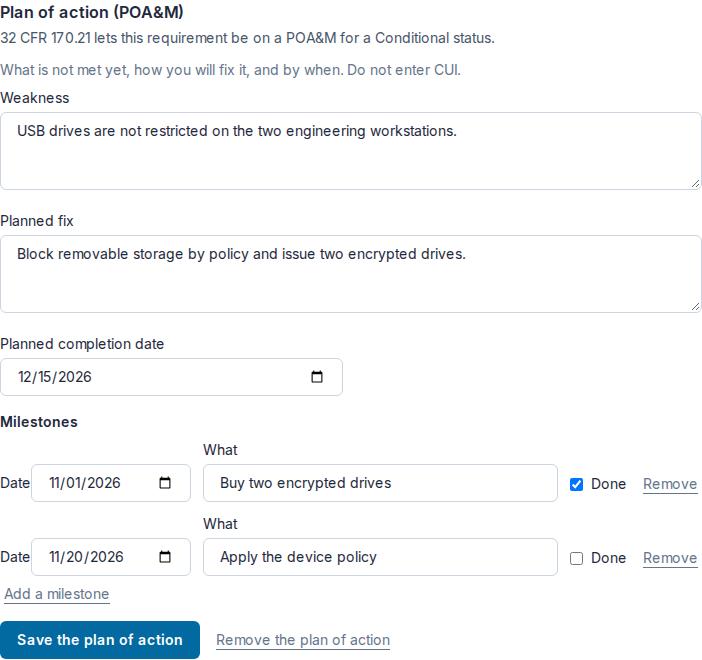
Above the plan, whether or not one is written, one line says what 32 CFR 170.21 makes of the requirement at its status now:
- the requirement may be on a POA&M for a Conditional status;
- it may be on one only when it is partly met (3.13.11), and must otherwise be met;
- it may not be on a POA&M at all, and must be met for a Conditional status;
- or the requirement is met or not applicable, so its plan is closed.
A plan stays saved when its requirement becomes met; it is shown as closed. Remove the plan of action deletes its weakness, plan and milestones, and the history keeps a line saying it was removed.
Evidence register
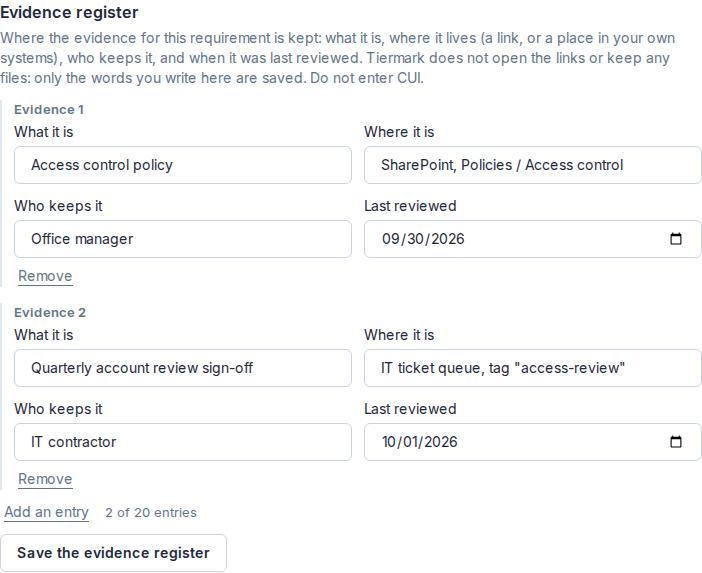
Where the evidence for the requirement is kept: up to 20 entries, each what it is, where it is (a link, or a place in your own systems), who keeps it, and when it was last reviewed (not a future date). Only the words you write are saved: Tiermark does not open the links and keeps no files. Save the evidence register keeps the entries; one with nothing in What it is is dropped when you save.
History
Every change to the requirement, oldest first, with the date and who made it: a status set directly, each objective determined or cleared, the statement saved or cleared, the owner set or removed, the plan of action saved (with its planned completion date) or removed, and the evidence register saved (with its number of entries) or emptied. Answers set on the requirement's own buttons are in it too, back to the first. The history never holds the text itself: your statements, plans and evidence stay in the workspace.
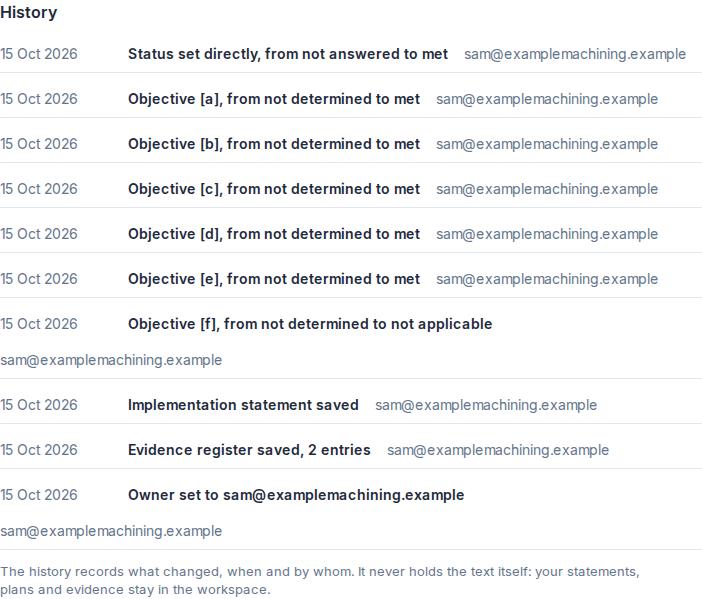
The history comes from the audit trail, and each line is checked against its sealed original before it is shown. A line that does not match says "Integrity check failed" instead of what it says. A line made moments ago may say "sealing" until it is.
Finding what needs work
Above the requirements: All, Not answered, Not met or partly met, Open POA&M (a plan on a requirement that is not yet met or not applicable), and No statement, each but All with its count; and an Owner filter: Anyone, Nobody yet, or one member. Under each requirement, one line sums up its workspace: how many objectives are determined, whether there is a statement, who owns it, and whether its plan of action is open or closed.
Who can change what
An admin or a contracts manager changes the objectives, the statement, the owner, the plan of action and the evidence register. Everyone in your organization can read all of it; a viewer sees what is saved, with no way to change it. A requirement takes one change at a time. Like the calculator, the workspace opens once your organization is verified.
What is kept, and who can see it
Everything in the workspace is your organization's alone. Primes do not see it, and nothing in Tiermark shares it. Tiermark support can see counts only: how many requirements have anything saved, how many objectives are determined, how many statements, owners, plans of action and evidence entries there are, how many plans are open and the planned dates of those, and your Conditional status date. Never which requirement, and never a word you wrote.
If Supplier Pro ends, nothing you entered is deleted, and you can still see all of it: your answers, your score and each requirement's workspace are shown as they were saved. Changing them needs Supplier Pro again.
The System security plan page puts the workspace together with a short form about your system into an outline of a system security plan, with your POA&M as a spreadsheet beside it.
Still have a question?
Write to help@tiermark.io and a person will answer.