Help For suppliers
Answering a request
How to answer a customer's DFARS 252.204-7012 attestation request, free: the link, verification, the questionnaire, signing, and who read your answers.
Updated · Edwards Consulting Group
A customer that uses Tiermark has asked your company to attest to the cybersecurity requirements it is held to on its DoD work. Answering is free, takes about ten minutes, and your answers come back to the customer signed.
The message and the link
The message comes from your customer's name "via Tiermark", at requests@mail.tiermark.io, with the subject "Your customer asks for your DFARS 252.204-7012 attestation by date". It names the questionnaire, the due date and any note your customer wrote, and it has one button: Open your request. Reminders before the due date carry the same button.
The link opens a page that shows who is asking, which company they are asking, the questionnaire and the due date, with two choices:
- Create your free account, if your company has no Tiermark account yet.
- I already have one, to sign in.
The request follows you through the sign-in. If the page says the link is not valid, check that you copied the whole link out of the message, then write to help@tiermark.io.
Confirming the company
After you sign in, a page asks Answer as your company? and says that confirming sets your account up for that company and puts the request on it. Nothing is created until you press Confirm. If it is the wrong company, write to help@tiermark.io instead.
When the confirmation creates your company's account, you also accept the terms of service and the privacy notice on its behalf and confirm that Controlled Unclassified Information will never be submitted.
The page may tell you one of these instead:
- This request is for another company. You already belong to a different company's organization, so the request was not attached to it.
- Ask an admin at your company to accept this request. You are a viewer on the company's organization. Forward the message to an admin or a contracts manager.
- Somebody at your company has already claimed this company. The company's account exists. Whoever set it up can answer there; to be added to it, write to us.
- Your company has a claim waiting to be confirmed. Somebody else opened a link for the company and neither of you has been verified yet. Whoever can show they represent the company gets it: sign in with an address at the company's registered domain and open your link again, or ask for a code.
Verification
Opening a link shows that the message arrived, not that you represent the company, so Tiermark confirms that before you may sign.
- Automatic: your sign-in address is on the domain of the website SAM.gov lists for the company, and the address has been confirmed. You are verified at once. An address on a shared mailbox host does not count.
- A one-time code: tell us an address at the company's SAM.gov website domain, and we mail a code to it. An admin or a contracts manager on your organization asks for it. It is not offered when SAM.gov lists no website for the company, or lists one on a shared mail host.
- A person: write to help@tiermark.io from a company address, and a person confirms within one business day.
While your organization is pending you see the one request you claimed and can read the questionnaire; signing waits. Anything else your customers have asked of the company appears once you are verified. See Verifying your organization.
The questionnaire
Open the request from Requests in your supplier console: press Answer on its row (Read while your organization is still pending verification, View once it is signed). Above the questions, the page says who asked, the status and the due date.
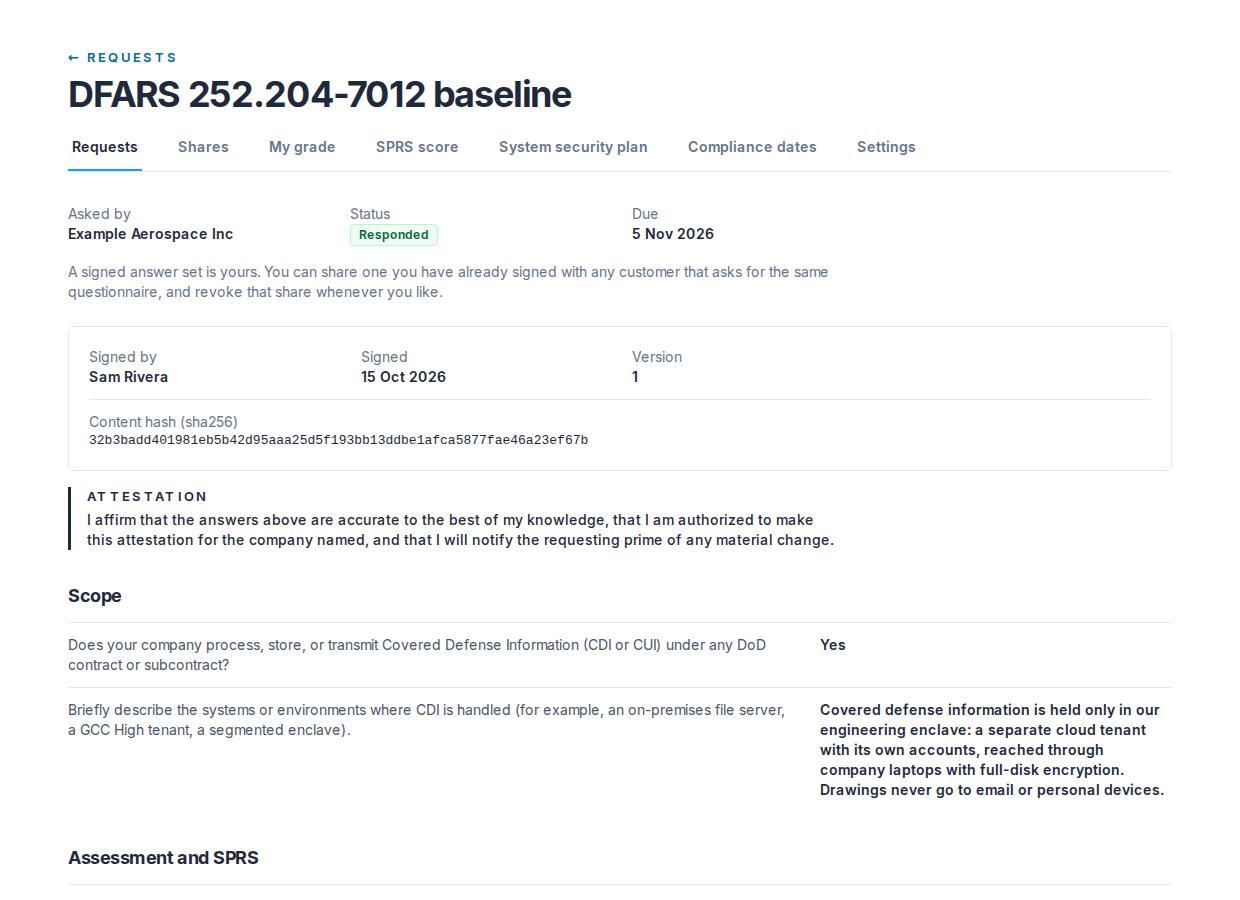
The DFARS 252.204-7012 baseline asks only what the clause and NIST SP 800-171 already require of you, in seven sections: Scope, Assessment and SPRS, Documentation, Incident reporting, Key controls, Flow-down and CMMC, and Attester. Required questions are marked with an asterisk; optional ones say so. Answers are yes or no (some allow not applicable), a number, a date, a short text or a choice from a list.
- Save draft keeps your answers so you can come back. Nothing is sent to your customer until you sign.
- The Attester section asks for the full name and title of the person attesting. That is the signature: the Sign box shows who you are signing as; to change it, change the Attester answers.
- The affirmation: a box to tick, stating that the answers are accurate to the best of your knowledge, that you are authorized to make the attestation for the company, and that you will notify the requesting prime of any material change. You cannot sign without it.
- Sign and send signs the answers. Any answer that needs attention is marked next to its question first.
Who may sign
An admin or a contracts manager. A viewer can read the whole questionnaire and cannot sign, because a signed answer set is the company's word to its customers.
What signing means
A signed answer set cannot be edited or deleted by anyone, Tiermark included. The page then shows who signed, when, the version and the content hash (SHA-256 of the answers, computed when they were signed). A correction is a new signature on a new request: ask your customer to send one.
Never enter Controlled Unclassified Information anywhere in the questionnaire. The text answers are for a brief description, not for the detail.
If a request has expired, the page says it expired after its due date, and to ask the customer to send it again if you still want to answer.
Answers suggested from your own records (Supplier Pro)
With Supplier Pro, questions you have not answered yet are filled in from your Compliance dates and your SPRS score calculator where those can answer them: whether and when you did your self-assessment, whether and when you posted it, whether you have a system security plan, and how many requirements are not yet implemented. Each filled answer has a note under it saying where it came from, and the page says how many were filled. Your SPRS score is never filled in: the question asks for the score you posted in SPRS, which Tiermark does not know; your calculator's score is shown beside it to compare. Check every suggestion before you sign.
Who has read these answers
Once signed, the request page lists every read of your answers, one line per customer per day for each kind of read: Read by a person at the customer, Read for the customer by its risk register (not a person), or Copied into an audit package by the customer, meaning a copy of your answers left in a file they can hand to a contracting officer. A read through a share you granted says so. The list comes from the audit trail, and nobody, Tiermark included, can edit or remove an entry in it.
Answering once
If you have already signed the same questionnaire for another customer, the request page offers to share those answers instead of answering again. See Sharing your answers.
Still have a question?
Write to help@tiermark.io and a person will answer.