Help For suppliers
Sharing your answers
Answer once, share with the customers you choose, revoke whenever you like: when the offer appears, what a customer learns, and how revoking works.
Updated · Edwards Consulting Group
A signed answer set is yours. When a second customer asks for a questionnaire you have already signed for another, you can share the answers you signed instead of answering again, and take the share back whenever you like.
When sharing is offered
Open a request from Requests. If your organization has already signed the same questionnaire (the same version) for another customer, and this request is not yet answered, a panel above the questionnaire says Answer once: "You signed this questionnaire on a date for another request. Share those answers with the customer instead of answering again." It names the questionnaire, the version, who signed it and how many customers it is shared with so far.
Press Share these answers with the customer's name, and confirm. The request is answered at once, and its row on Requests reads Responded, with "By sharing" and the date under it.
The offer does not appear while your organization is pending verification, for a viewer, for an expired or already answered request, or when nothing has been signed yet.
What the customer learns
The customer reads the answer set exactly as it was signed: the same answers, the same signer, the same date and the same content hash. It is told that the answers were signed for another customer on that date, and never which customer. The other customer's name is not reachable from their account.
Their read of the shared answers is recorded like any other, and your request page's Who has read these answers marks it "through a share you granted". See Answering a request.
Revoking
A request answered by sharing shows Answered by sharing above the questionnaire, with a Revoke button. Press it and confirm.
- Immediate. The customer's next read of the answers returns nothing; the attestation page on their side shows nothing.
- They keep nothing. No copy stays on their account.
- Their request goes back to waiting for an answer. One share can answer more than one request from the same customer; revoking returns all of them, and the panel says how many. You can then answer fresh or share again.
Revoking does not wait for verification: putting the company's word out needs a verified organization, taking it back does not.
The Shares tab
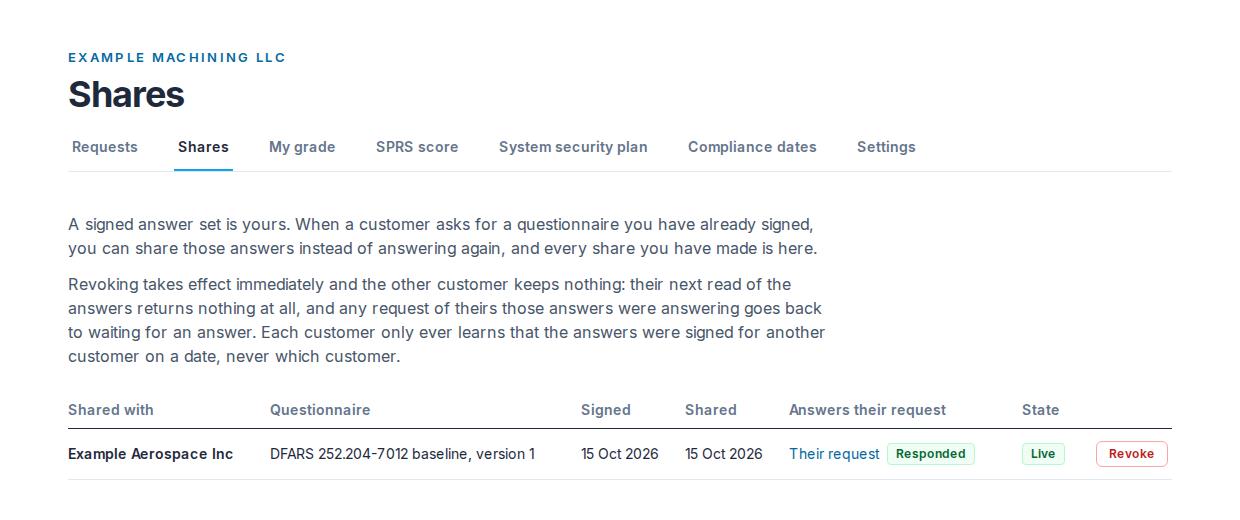
Shares in your supplier console lists every share your organization has ever made: Shared with, the Questionnaire and its version, when it was Signed, when it was Shared, Answers their request (a link to each of that customer's requests it answers, with the request's status), its State (Live, Revoking, or Revoked with the date), and Revoke for one not yet revoked. A revoked share stays on the list, because who could once read an answer set is part of your own record.
Who may share and revoke
An admin or a contracts manager, the same two roles that may sign in the company's name. A viewer sees the shares and cannot change them.
A prime answering its own customers shares and revokes the same way, from the request page under its Received tab; it has no Shares tab. See Answering your own customers.
Still have a question?
Write to help@tiermark.io and a person will answer.