Help For primes
Campaigns
A campaign asks chosen suppliers for a signed DFARS 252.204-7012 attestation by a due date: what suppliers receive, when reminders go, when a request expires.
Updated · Edwards Consulting Group
A campaign is one ask: you choose suppliers from your map, a questionnaire and a due date, and each supplier receives an invitation in your name. Answering is free for them, and their answers come back signed. See Requests and signed answers for what happens after.
Who can send one
- A paid prime plan. Campaigns are what a plan buys; Prime Free does not include them. On the free plan the Campaigns tab offers Choose a plan to send campaigns on its title row instead (or Choose a plan, before any campaign has been sent); either opens the Overview, where the Plan strip is. See Plans and prices.
- An admin or a contracts manager. A viewer sees the list of campaigns and cannot send one.
The New campaign form
On Campaigns, press New campaign on the title row. Before your first campaign the list is empty and the button there reads Send your first campaign.
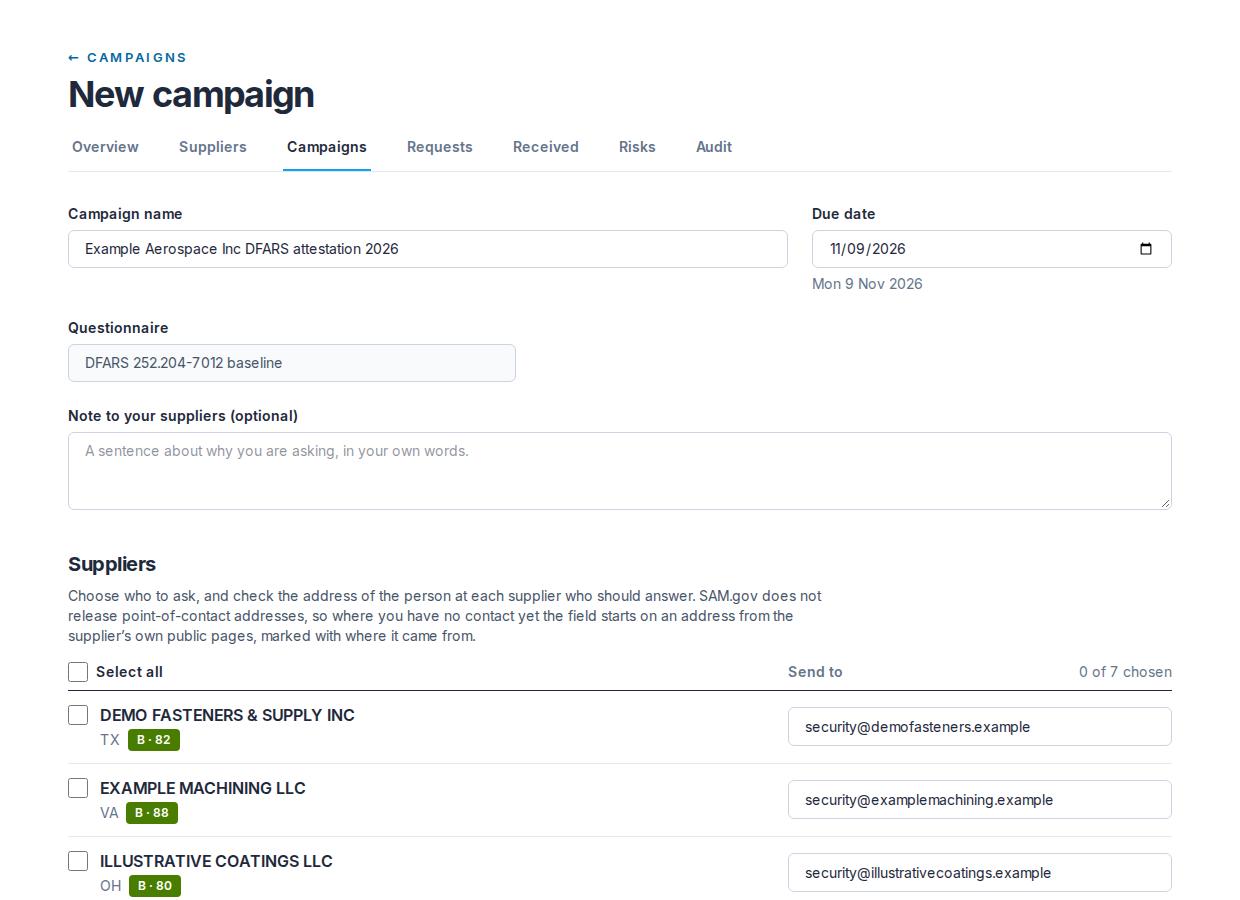
- Campaign name: starts as your organization's name, "DFARS attestation" and the year. It is the row in your campaigns list.
- Due date: starts 21 days from today, and the day you choose is shown under the field with its weekday. The day ends at the end of that day in UTC; the message shows the date, and the reminders count towards it in UTC days.
- Questionnaire: the DFARS 252.204-7012 baseline. It is the only questionnaire today, so it is stated rather than chosen. What the clause itself asks of a supplier is in DFARS and FAR cyber clauses.
- Note to your suppliers (optional): a sentence in your own words, up to 600 characters. It appears in the invitation as "From your organization: your note".
- The suppliers: every supplier on your map, with its state and grade and a Send to address. Tick the ones to include, or tick Select all to include every supplier that can be chosen; the line beside it counts how many are chosen.
The address is the person at the supplier who should answer, and it is yours to keep: SAM.gov point-of-contact addresses are For Official Use Only and never reach Tiermark. Where you have no contact yet, the field starts on an address read from the supplier's own public pages, marked "From" and the website it came from; change it if it is wrong, and the mark goes. Nobody is ticked for you.
Press Send to N suppliers. The button stays off, with the note "Choose at least one supplier above", until one is ticked. The campaign is written and the invitations go out, one at a time.
The limits, and what refuses a campaign
- At most 2,000 recipients in one campaign. Larger, split it.
- Every supplier must be on your map.
- Every address must look like an email address.
- A contact who has unsubscribed cannot be chosen: the form says "This contact has unsubscribed" in place of the address, and the box cannot be ticked.
- The due date cannot be in the past.
- The name and the note may not carry a controlled-information marking.
A refusal stops the whole campaign and nothing is sent. A warning does not: if a supplier has a domain of its own and the address you gave is on a shared mailbox host, the message is sent and the result page says so under Worth a look.
After you press Send
The result page says how many invitations were delivered and lists any that were not, with the reason. A request whose invitation was not delivered stays on your ledger. The invitation itself is not sent again; the next reminder point (7 days before the due date, or sooner if the date is closer) writes to the address again, so correct a wrong address with a new campaign rather than waiting. A large campaign may be answered before it is finished; its page shows how far it has got, and you do not need to send it again. If Tiermark's outgoing mail is paused, the invitations go out when it resumes.
What your supplier receives
- From: your organization's name "via Tiermark", at requests@mail.tiermark.io.
- Subject: "Your organization asks for your DFARS 252.204-7012 attestation by date".
- The body: that you are asking them to complete the attestation because you have to know that the suppliers on your DoD work meet the clause you are held to; the questionnaire and the due date; your note, if you wrote one; and the Open your request button.
- What the link does: it opens their request. They set up a free account for their company, or sign in to the one it has, and the questionnaire is there. Answering is free and takes about ten minutes.
- Answer once: the same signed answers can later be shared with other primes that ask.
- The footer: "Sent on behalf of your organization by Tiermark, a service of Edwards Consulting Group, Swansboro, North Carolina", and the link Unsubscribe from these requests.
See Answering a request for what the supplier does next.
Reminders
An hourly run sends at most one reminder per request at each of three points: 7 days before the due date, 3 days before, and on the due date. Days are counted in UTC calendar days, the same way the message shows the date.
- Only the most urgent reminder the due date has reached is sent. A request created two days before its due date gets the 3-day reminder straight away and the due-date reminder on the day, and never the 7-day one.
- A reminder is never sent out of order: once a more urgent point has been reached, an earlier one that was not sent is skipped. A point that has been reached and not yet sent goes out at the next hourly run, which for the due-date reminder can be after the due date; the message then says the date has passed.
- Each reminder carries its own Open your request link, so a supplier who deleted the invitation can still open the request.
- Reminders go only for requests that are invited, opened or started, to a contact who has not unsubscribed.
- If a request's invitation was not sent within an hour of the campaign being created, the hourly run sends it. That invitation does not carry your note.
Expiry
A request that has not been signed is marked expired the day after its due date, in UTC, never on the due date itself. The due-date reminder always goes out before the request expires.
An expired request cannot be answered. The supplier's screen says the request expired after its due date and to ask you to send it again. To ask again, send a new campaign to that supplier.
The campaign page
Press a campaign's name on Campaigns. The page shows the questionnaire, the due date, when it was sent, its status and your note, then:
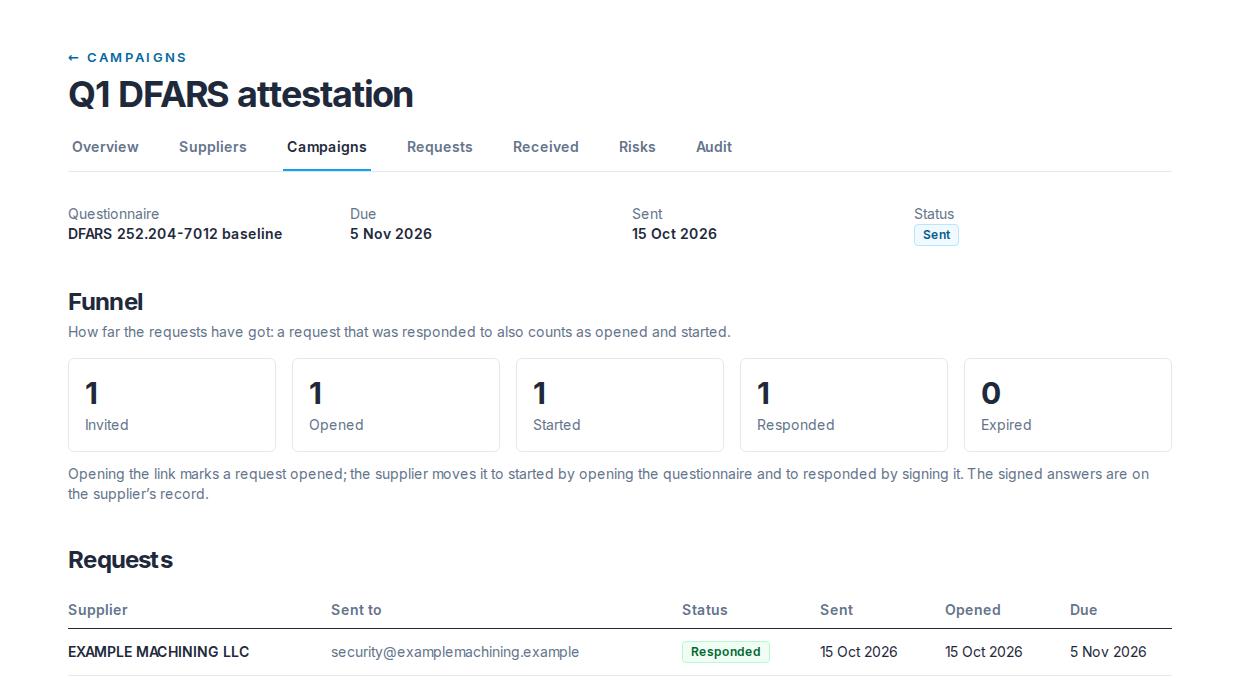
- The funnel: how many requests are invited, opened, started, responded and expired. The counts are cumulative: a responded request also counts as opened and started.
- The requests: one row per supplier, with the address it was sent to, its status, when it was sent, when it was opened and the due date.
The Campaigns list shows each campaign's questionnaire, due date, number of requests, how many were opened, and its status.
There is no pause or cancel
Once sent, a campaign cannot be paused, cancelled or closed from the console, and a sent invitation cannot be recalled. If a campaign has to stop, write to help@tiermark.io with the campaign's name.
Unsubscribes
Every invitation and reminder carries an unsubscribe. The link in the footer, Unsubscribe from these requests, opens a one-sentence page with an Unsubscribe button; the unsubscribe button mailbox providers show acts at once. Nobody at Tiermark reviews it, and nothing asks the person to confirm by email.
- It covers that address as the contact for that supplier, for your organization. If you use the same address for a second supplier, that one is not covered. The person will not be written to on your behalf again, and reminders for their open requests stop. Another prime's requests to the same address are not affected.
- Their existing requests stay on your ledger and expire on their due date like any other.
- On your side, the New campaign form marks the contact "This contact has unsubscribed" and will not send to it. If you want to reach that supplier again, use a different address at the company, or ask the person to write to help@tiermark.io.
Still have a question?
Write to help@tiermark.io and a person will answer.