Help For primes
Requests and signed answers
The attestation ledger of every request you have sent: read signed answers and their content hash, see every read recorded, and export the ledger as CSV.
Updated · Edwards Consulting Group
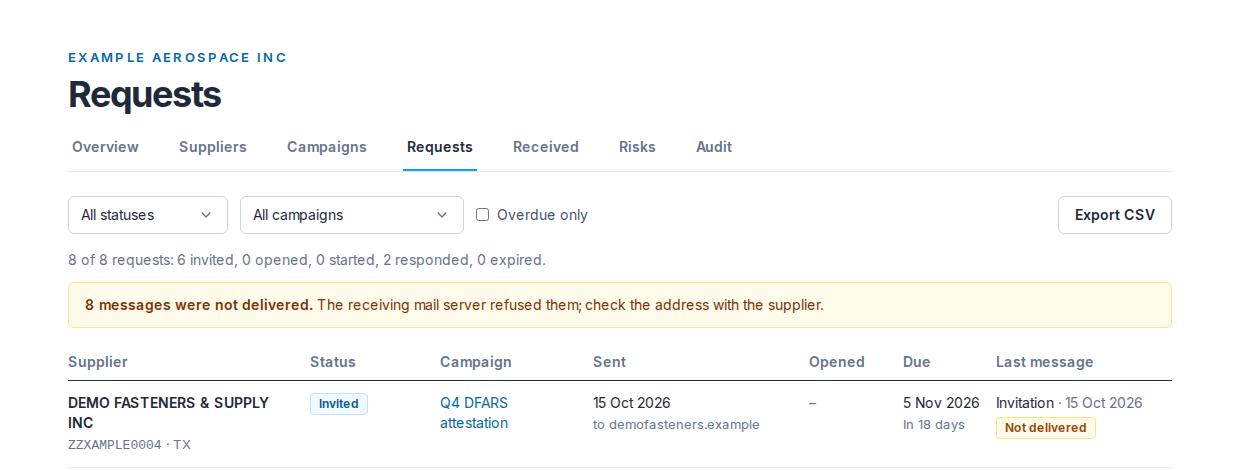
Requests is the attestation ledger: every request your organization has ever sent, across every campaign, in one table. Everyone in your organization can read it.
The Requests screen
The line above the table reads "N of M requests" and counts them by status: how many are invited, opened, started, responded and expired. When a message was refused by the receiving mail server, a notice under it says how many were not delivered and to check the address with the supplier.
| Status | What it means |
|---|---|
| Invited | The invitation was sent |
| Opened | The supplier opened the link in the message |
| Started | The supplier opened the questionnaire |
| Responded | The supplier signed its answers |
| Expired | The due date passed with no signature |
The filters are All statuses, All campaigns and Overdue only. Each applies as soon as you choose it. A request is overdue when its due date has passed and it is neither responded nor expired.
| Column | What it shows |
|---|---|
| Supplier | The company the request went to, with its UEI and state under the name |
| Status | As above. A responded request has Read the answers under its status |
| Campaign | A link to the campaign |
| Sent | The date, with the domain of the address it went to under it ("to example.com"), never the address itself |
| Opened | The date |
| Due | The due date, and under it how far off it is: "In N days", "Due tomorrow", "Due today", or "N days overdue" in red once the date has passed |
| Last message | The last message sent for this request (an invitation or a reminder) and its date, with a Not delivered chip if the receiving mail server refused it |
Reading a supplier's signed answers
Signed answers are on the supplier's record: open Suppliers, press the supplier, and in the Attestation timeline press Read the answers. A responded request on the Requests screen has the same Read the answers link, which works whether or not the supplier is still on your map. The page shows who signed and their title, when, the version, the content hash, the affirmation the signer accepted, and every question with its answer.
A signed answer set is immutable: nobody, Tiermark included, can edit or delete it. The content hash is SHA-256 of the answers, computed when it was signed. It is the supplier's attestation and not a Tiermark determination.
Every read is recorded
Every time your organization reads a supplier's signed answers, a line is written to the audit trail, and the supplier sees it on its own side, one line per customer per day for each kind of read. There are three ways a read happens:
- A person opening it: the attestation page, or the supplier's record, whose Attested SPRS card reads the newest signed answer set.
- Your risk register reading it: pressing Derive from signed answers and findings on the supplier's record.
- An audit package copying it: building a package puts a copy of the answers in a file you can hand on, and the supplier is told exactly that.
The trail cannot be edited or removed by anyone.
Answers shared from another customer
A supplier that already signed the same questionnaire for another customer can answer your request by sharing those answers instead of signing again. On the timeline the row says "Shared from an attestation signed on a date for another customer", and the attestation page says the same. It is the same immutable document, with the same signer, the same date and the same content hash. You learn that it was signed for another customer on that date, never which customer.
The supplier can revoke the share at any time. Revoking takes effect immediately: the page then shows nothing, and the request goes back to waiting for an answer. See Sharing your answers for the supplier's side.
Exporting the ledger as CSV
Export CSV on the Requests screen downloads the table as it is filtered, as a file named with the day's date. It is part of every paid prime plan; on Prime Free the button reads CSV export comes with a plan. Anyone in your organization may export, viewers included.
The file has one row per request and these columns: Supplier, UEI, State, Campaign, Contact domain, Questionnaire, Status, Sent at, Opened at, Last message kind, Last message at, Due, Days to due. Every date is written in ISO 8601, in UTC.
- Contact domain only. No address, token or code is ever in the file; the contact is represented by the domain of its address alone.
- Status is written in the screen's words, in lower case: invited, opened, started, responded, expired.
- Each export is recorded in your audit trail with the row count and the filters, and nothing about which suppliers were in it.
The same ledger, with the same columns, goes into every audit package.
Still have a question?
Write to help@tiermark.io and a person will answer.